![header-logo.dfd0f01451fc4201cdeb6bea513c8257.svg]](https://20049731.fs1.hubspotusercontent-na1.net/hubfs/20049731/header-logo.dfd0f01451fc4201cdeb6bea513c8257.svg)
1. If Your Release Is Still “Pending Review”
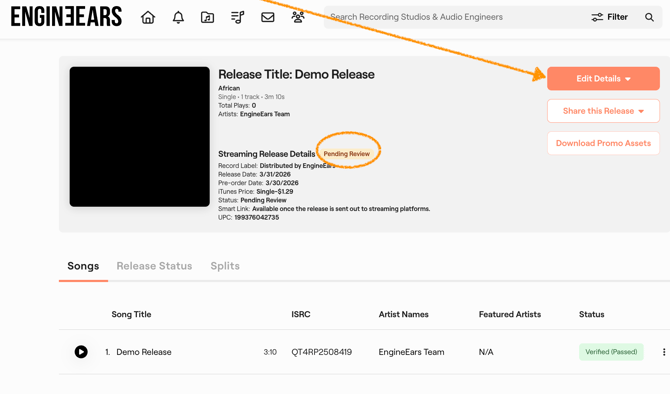
If your release has not been approved yet, you have full control.
You can:
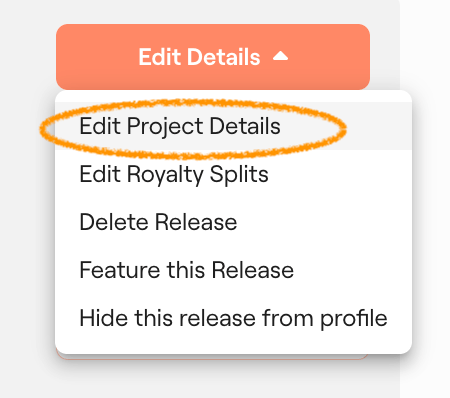
- Edit metadata (artist name, title, etc.)
- Replace audio files
- Update cover art
- Adjust release details
How to do it:
Simply go into your release on your dashboard and make the changes directly.
No need to contact support at this stage.
2. If Your Release Has Already Been Approved or Delivered
Once your release has been approved and sent to DSPs, you will need to contact support to make any changes.
What to include in your request:
- Project Name
- UPC
- Clear description of the change
Examples:
- “Update cover art”
- “Replace audio file for Track 2”
- “Fix artist name formatting”
If you are replacing files (audio or artwork), please include a Dropbox or Google Drive link with the updated files.
Our team will review your request and process the update with the DSPs.
3. If You Are Migrating a Release from Another Distributor
If your release is currently being migrated, we cannot make any changes yet.
This is because:
- We do not own or control the release until migration is fully completed
- Your previous distributor still owns the release during this process
What you need to do
- Do not request changes until migration is complete
- Do not take down your release from your previous distributor
Your release must remain live on DSPs in order for migration to work.
If it is taken down too early, the migration will fail and it will be treated as a brand new release.
Why this matters
To successfully transfer your release and keep your streams (especially on Spotify), everything must match exactly during migration.
If changes are made too early, you risk:
- Losing existing streams
- Breaking metadata matching
- Delays or failed migration
How to ensure your migration is successful
You can follow this guide:
https://support.engineears.com/en/knowledge-base/how-do-i-confirm-my-release-migrated-successfully
Or join our Office Hours, where our A&R team can walk you through the migration step by step and make sure everything is set up correctly before you proceed.
When can you request changes?
Once you have confirmed that:
- Your release has successfully migrated
- The EngineEars version is live alongside the original
Then you can:
- Submit a support ticket
- Request updates to your release
Best Practices
- Double-check your release before submitting for review
- Avoid making changes during migration
- Keep your release live with your previous distributor until migration is confirmed
- Be as specific as possible when submitting a support ticket
- Include all necessary files upfront to avoid delays