![header-logo.dfd0f01451fc4201cdeb6bea513c8257.svg]](https://20049731.fs1.hubspotusercontent-na1.net/hubfs/20049731/header-logo.dfd0f01451fc4201cdeb6bea513c8257.svg)
Why this matters
When you release under a new name, DSPs need time to:
- Create your new artist profile
- Map your release correctly
- Allow you to claim your profile (Spotify for Artists / Apple Music for Artists)
If this isn’t done properly, your release can end up:
- Mapped to the wrong artist
- Missing from your intended profile
- Delayed in visibility during your rollout
Step 1: Plan ahead (at least 7 days)
We strongly recommend uploading your release at least 7 days before your release date.
This gives enough time for:
- Profile creation on Spotify & Apple Music
- Proper mapping across all platforms
- Avoiding last-minute issues that could impact your rollout
Step 2: Submit your release on EngineEars
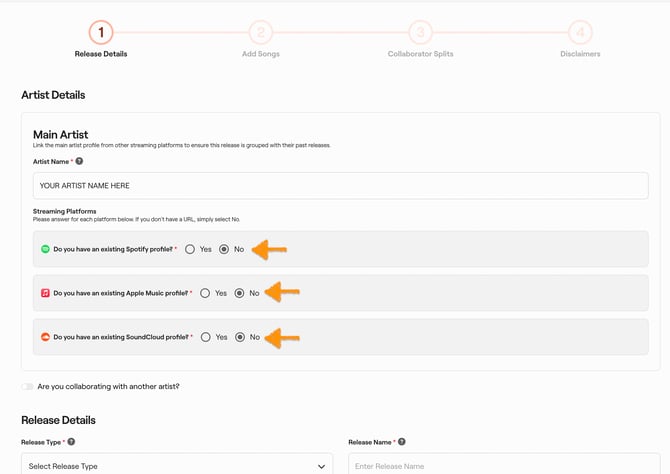
Upload your project as usual through EngineEars with your new artist name (Exactly how you want it to appear)
Make sure to select "NO" when asked "Do you have an existing profile"
Step 3: Contact support after submission
https://support.engineears.com/en/knowledge-base/kb-tickets/new
Once your release is submitted, you’ll need to notify our team so we can ensure your new profile is created correctly.
Submit a support ticket with:
- Project Name
- UPC
- Confirmation that this is your first release under a new artist name
- A note that you need a new artist profile created
Step 4: Wait for profile creation and mapping
Our team will:
- Ensure your new artist profile is created on DSPs
- Confirm that your release is mapped correctly
- Provide you with your Spotify and Apple Music artist profile links
Step 5: Claim your artist profiles
Once your profiles are live, you can claim them via:
- Spotify for Artists
- Apple Music for Artists
This allows you to manage your page, access analytics, and customize your profile.
Step 6: Future releases
This process is only required for your first release under a new name.
For all future releases:
- Simply include your existing Spotify & Apple artist profile URLs during upload
- No need to request profile creation again
Key takeaway
If you're releasing under a new name, timing is everything. Upload early, notify support, and let us help ensure everything is set up correctly so your rollout goes exactly as planned.